
Stale CRM data is one of the most common reasons B2B pipeline forecasts miss. When contact titles are outdated, company headcounts are wrong, or phone numbers are disconnected, reps waste time and deals stall.
Salesforce data enrichment solves this by automatically appending verified, current data to your CRM records. This guide covers what enrichment is within Salesforce, and the top tools on the market that'll help you do it. You'll also learn the difference between enrichment and cleansing, common pitfalls to avoid, and how to choose the right tool for your GTM motion.
What Is Salesforce Data Enrichment?
Salesforce data enrichment is the process of supplementing your existing CRM records with verified external data. The goal is simple: fill in gaps, correct outdated fields, and give your revenue team the context they need to prioritize the right accounts and personalize outreach.
Here’s what it looks like in practice. A lead fills out a form with their name and work email. Within seconds, your enrichment tool appends their job title, seniority level, direct phone number, department, company size, industry, tech stack, and buying intent signals. What started as a two-field record becomes a fully actionable lead your SDR can call with confidence.
Enrichment runs in two modes: real-time, which fires the moment a record is created or updated, and batch, which runs on a schedule to refresh existing records. Most high-performing teams use both, and we cover how to set each one up later in this guide.
The distinction matters because your enrichment method affects speed-to-lead, data freshness, and operational overhead. A form fill that sits unenriched for 24 hours is a form fill your competitor already called.
Why Salesforce Data Quality Matters
Clean data is the foundation of every reliable GTM motion. Without it, your lead scores are unreliable, your routing rules misfire, and your pipeline forecasts inflate.
Consider what happens when data decays:
A contact changes jobs, and your rep sends a pitch to someone who left six months ago.
A company doubles its headcount, but your ICP filter still marks it as "too small."
A phone number disconnects, and your SDR burns 15 minutes researching a replacement before making a single dial.
These failures compound across hundreds of reps and thousands of records.
The downstream effects hit every team. Marketing runs campaigns against segments built on outdated firmographics. Sales leadership forecasts revenue based on pipeline stages attached to contacts who no longer hold buying authority. RevOps spends cycles troubleshooting routing rules that fail because the underlying data is incomplete.
Clean, enriched data fixes these problems at the source. When your Salesforce records carry accurate titles, verified phone numbers, current company details, and real-time intent signals, your team spends less time researching and more time selling. Lead scores reflect reality. Routing rules fire correctly. Forecasts hold up in board meetings.
Every minute a rep spends compensating for bad data is a minute they are not closing revenue.
Types of Data You Can Enrich in Salesforce
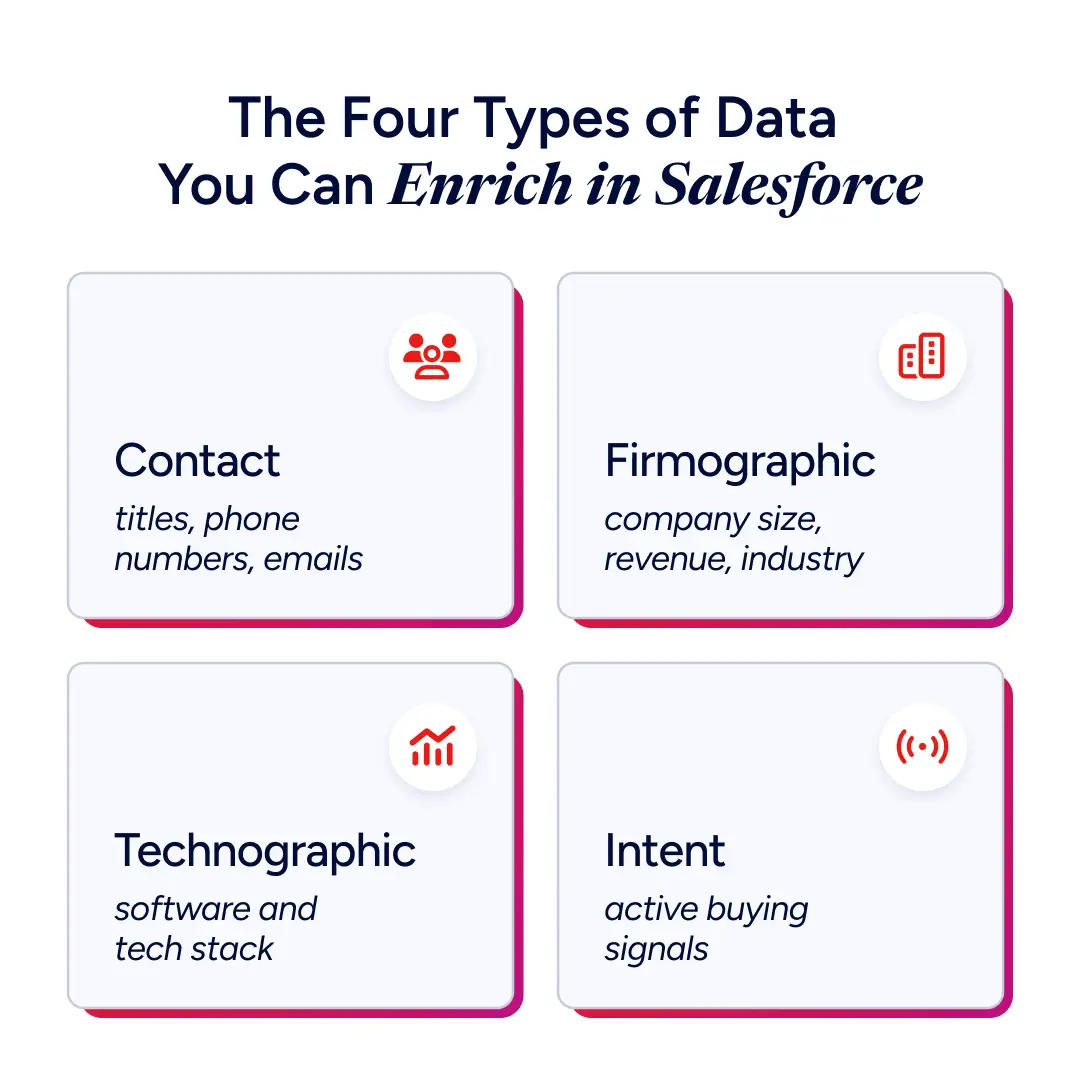
Salesforce data enrichment covers four main categories. Each serves a different function in your GTM workflow. The most effective enrichment strategies use all four together.
Contact Data
Contact data includes job title, seniority level, direct phone number, verified work email, LinkedIn profile URL, and department. This is the foundation of personalized outreach.
Without accurate contact data, your reps cannot reach the right person, address them by their current role, or tailor messaging to their responsibilities. Enriching contact fields reduces the time SDRs spend manually researching prospects on LinkedIn or corporate websites. It also improves email deliverability by replacing generic addresses with verified inboxes.
Firmographic Data
Firmographic data covers employee count, annual revenue, industry classification, headquarters location, and ownership type (public, private, PE-backed). This is the backbone of ICP matching and account scoring.
Your ideal customer profile likely includes firmographic criteria: "B2B SaaS companies with 200 to 2,000 employees in North America." If your Salesforce records are missing employee count or industry fields, your scoring models cannot distinguish a perfect-fit account from a poor one. Enriching firmographics ensures your ICP filters work as designed.
Technographic Data
Technographic data reveals which software and technology a company uses. If a prospect runs Salesforce, Marketo, and Snowflake, that tells you something specific about their tech maturity, budget, and potential pain points.
For software sellers, technographic enrichment is a strong buying signal. It helps you:
Identify accounts already using a competitor's product
Target companies with complementary tech stacks
Tailor demos to the tools a buyer already knows
Competitive displacement campaigns depend on this data.
Intent Data
Intent data captures behavioral signals that indicate a company is actively researching or evaluating solutions in your category. These signals come from content consumption patterns, search behavior, and engagement across third-party sites.
Intent enrichment elevates your scoring models beyond static firmographic and contact attributes. Instead of guessing which accounts are "in-market," you can prioritize the ones showing active buying behavior right now. This is especially valuable for outbound teams that need to time their outreach to the buying window.
How To Set Up Salesforce Data Enrichment
Setting up enrichment involves three phases: auditing your current data, selecting your enrichment method, and mapping fields with clear overwrite rules. Skipping any of these steps leads to messy implementations and unreliable results.
1. Audit Your Current CRM Data
Start by understanding what you have. Pull a report on your Salesforce contacts, leads, and accounts, plus any custom objects your team uses for pipeline tracking. Identify which fields are empty, which are outdated, and which objects have the most gaps.
Common patterns include:
Phone numbers missing on the majority of your lead records
Job titles populated but stale
Duplicate records that will multiply errors once enrichment runs
Establish a baseline before you activate any enrichment tool. Document your fill rates for critical fields: direct phone, job title, company size, industry, and email. This gives you a clear "before" metric to measure enrichment ROI against.
2. Choose an Enrichment Method
You're making two decisions here. How enriched data reaches Salesforce, and how often it arrives. Delivery comes down to three paths, covered in the next section. Timing comes down to two modes, and most teams run both.
Real-time enrichment fires the moment a new record enters Salesforce or an existing record is updated. This is ideal for inbound-heavy and high-velocity sales teams where speed-to-lead matters. A form fill comes in, enrichment runs instantly, and the lead is routed to the right rep with full context before the prospect closes their browser tab.
Batch enrichment runs on a schedule, sweeping through your existing database to refresh fields and fill gaps. This is the right approach for historical cleanup, ongoing data hygiene, and large-scale re-enrichment projects.
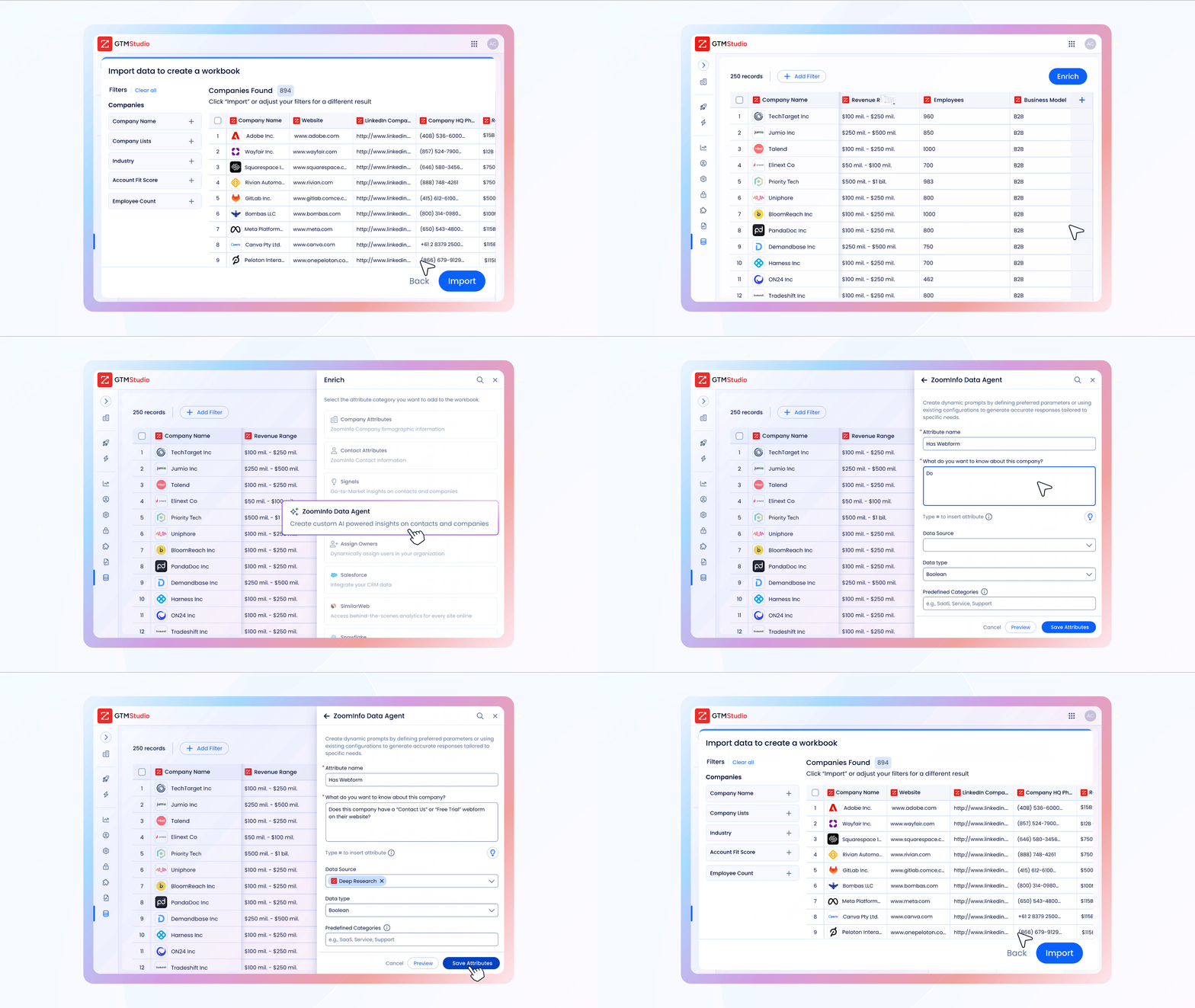
ZoomInfo's GTM Studio supports both. Its waterfall enrichment engine pulls from 25+ data sources to maximize fill rates across every record. Instead of relying on a single data provider, waterfall enrichment queries multiple sources in priority order, filling each field with the highest-confidence match available. This multi-source approach is critical for teams that need high coverage across industries, geographies, and company sizes.
3. Map and Validate Your Data
Field mapping is where most enrichment implementations fail. You need to define exactly which enrichment fields write to which Salesforce fields, including standard objects (Lead, Contact, Account) and the custom fields your team relies on. You also need to specify what happens when both sides already have data.
Set explicit overwrite rules for every mapped field:
Job title: Let enrichment overwrite existing values since titles change frequently.
Company name: Preserve existing values to avoid overwriting custom naming conventions.
Phone number: Overwrite only if the existing number is disconnected or blank.
Test your mapping in a Salesforce sandbox before going live. Run enrichment on a sample set of 100 to 500 records and review the results field by field. Look for unexpected overwrites, formatting mismatches, and duplicate creation.
Set a review cadence. Schedule monthly or quarterly audits of your enrichment output to catch mapping drift and data quality regressions before they compound.
Salesforce Data Enrichment API and MCP
Salesforce retired Data.com in 2020 and never replaced it natively. Data Cloud resolves identity across data you already own, so filling in net-new external fields still means bringing in a provider. The enrichment question becomes an integration question.
Three paths get external data into Salesforce records.
Native app. The provider's managed package installs from the AppExchange and writes to Lead, Contact, and Account records with no code. ZoomInfo's Salesforce integration runs Instant Enrich on record creation and Scheduled Enrich for batch refreshes, and you map its output to custom fields on those standard objects. It handles the large majority of implementations.
API. A Record-Triggered Flow fires on create or update, sends an HTTP Callout to the provider's enrich endpoint, and writes the response back to the record. Teams build this when they need to enrich their own custom objects, chain several providers in a waterfall, apply filtering logic before a credit gets spent, or run enrichment inside an orchestration platform before Salesforce ever sees the record. It costs engineering time the native app doesn't, so confirm the managed package can't do the job first. For endpoints, credits, and architecture, see our guide to the data enrichment API.
MCP. Model Context Protocol connects an AI assistant straight to the provider's data. With ZoomInfo MCP, a rep can ask Claude or ChatGPT who the buying committee is at an account, and a RevOps analyst can pull an ICP-matched list without opening a query builder. It suits research and list-building. Keeping a large org current still runs through Scheduled Enrich or a batch pipeline. See how ZoomInfo connects to Claude via MCP, or GTM AI if you're building agent workflows on your own stack.
Whichever path you take, budget for credits. Providers charge per record retrieved, and ZoomInfo's Enrich draws bulk credits in a Salesforce sandbox exactly as it does in production. Test in small batches.
Top Salesforce Data Enrichment Tools
You can break tools for Salesforce data enrichment into three categories:
Salesforce's native capabilities
AppExchange point solutions
Standalone data-as-a-service (DaaS) platforms.
Each category trades off differently on data depth, integration complexity, and ongoing cost.
Salesforce Data Cloud offers basic enrichment within the platform. It is convenient for teams already invested in the Salesforce ecosystem, but its B2B data depth and coverage are limited compared to dedicated enrichment providers.
AppExchange solutions offer purpose-built enrichment apps that install directly into your Salesforce org. These tend to specialize in narrow use cases, like email verification or phone number appending, but often lack the breadth to cover firmographic, technographic, and intent data in a single platform.
DaaS platforms operate at a different scale entirely. They maintain their own proprietary data assets, verification pipelines, and intelligence layers, then push enriched data directly into Salesforce via native integrations or APIs.
ZoomInfo is the most comprehensive Salesforce data enrichment tool. Its B2B data foundation includes 500M+ contacts and 100M+ companies, with 1.5B+ data points processed daily to keep records current. The multi-source verification process means that ZoomInfo reports up to 95% first-party data accuracy.
Verification is what separates ZoomInfo from single-source providers:
Machine learning algorithms scanning 28M+ domains
Partner data covering 95M+ businesses
A contributory network of 200K+ users who share real-time contact updates
300+ in-house human researchers who manually verify records
This layered approach catches changes that single-source tools miss: job changes, company restructurings, phone number rotations, and email domain migrations.
For Salesforce teams specifically, ZoomInfo offers a native integration that writes directly to Salesforce fields, no custom API development or import workflows required.
The GTM Context Graph layers ZoomInfo's proprietary B2B data with your own first-party CRM and engagement signals, so enrichment decisions reflect both external intelligence and your team's existing relationship context.
How to set up ZoomInfo's Salesforce integration
RevOps teams get the cleanest setup by following ZoomInfo's documented flow:
Use the default Service Account connection rather than Individual User Accounts to avoid per-user troubleshooting and keep ownership logic consistent
Install the ZoomInfo Salesforce Native App from the AppExchange for inline data on Lead, Contact, and Account records, plus the ZoomInfo, Scoops, and Intent custom objects
Confirm the service account user has read/write access to Account, Contact, Lead, Campaign, and Campaign Member, plus read access to Opportunity and User
Set per-field overwrite rules using "Complete if missing" as the default, and "Overwrite" only for fields that change often like job title
Use the Test Mapping button to export and delete a test record before saving
Choose between Standard ZoomInfo Duplicate Checking (ZoomInfo ID → Website → Company Name for accounts; ZoomInfo ID → Email → Name + Company for people) and Custom Duplicate Checking, which uses Salesforce's own duplicate rules and needs Author Apex permissions
How to Evaluate an Enrichment Tool
When evaluating any enrichment tool, score it across six criteria:
Data accuracy. What is the provider's stated accuracy rate, and how do they verify it? Ask for a data test against your own records.
Native Salesforce integration. Does the tool write directly to Salesforce, or does it require middleware, Zapier workflows, or manual CSV imports?
Data source breadth. Does the provider rely on a single data source, or does it aggregate and verify across multiple sources?
Real-time and batch support. Can you run both real-time enrichment on new records and batch enrichment on your existing database?
API and agent access. Can you reach the data programmatically for custom objects and non-standard triggers, and does the provider support MCP for AI agent workflows?
Compliance. Does the provider maintain GDPR and CCPA compliance, and can you configure enrichment rules to respect regional data regulations?
Data Enrichment vs. Data Cleansing
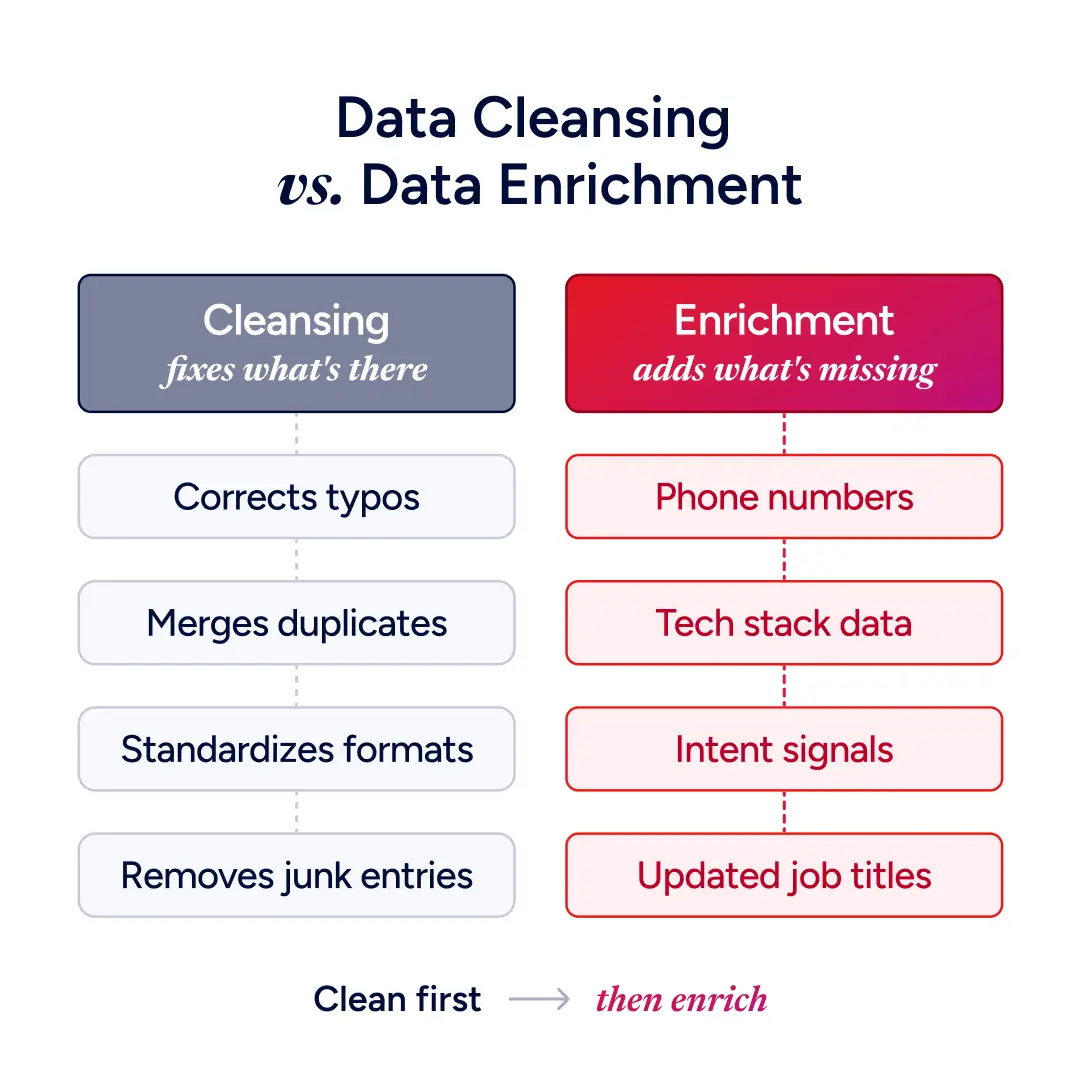
These two terms get used interchangeably, but they solve different problems. Understanding the distinction helps you sequence your data operations correctly.
Data cleansing focuses on fixing, standardizing, and deduplicating existing data. It corrects typos in company names, merges duplicate records, standardizes phone number formats, and removes junk entries. Cleansing does not add new information. It makes existing information reliable.
Data enrichment adds new information to records that cleansing alone cannot provide. It appends fields your team never collected: direct phone numbers, tech stack details, intent signals, updated job titles. Enrichment expands the usefulness of each record.
Both are necessary, and the order matters. Run cleansing before enrichment. If you enrich a database full of duplicates, you waste enrichment credits and create conflicting records. If you enrich before standardizing company names, your matching algorithms will misfire. Clean first, then enrich on a solid foundation.
The best practice for ongoing data operations: run a cleansing pass quarterly, then layer continuous enrichment on top. This keeps your Salesforce org clean and current without manual intervention.
Common Challenges and How To Solve Them
Every enrichment implementation hits friction. Knowing the common failure points helps you plan around them:
Data decay. Contact data changes constantly, so a one-time enrichment pass goes stale within months. Set up continuous enrichment that refreshes records on a recurring schedule, not just at creation time.
Duplicate records. If you have three records for the same contact, enrichment updates all three independently and creates conflicting data. Run a deduplication pass before activating enrichment, then enrich the surviving records.
Field mapping conflicts. A misconfigured overwrite rule can wipe out good data or leave enriched fields blank when an "only fill empty" rule triggers on a placeholder value. Audit your mapping setup on a regular cadence, since rules that worked at launch can break as new fields and objects are added to your Salesforce org.
Compliance requirements. GDPR, CCPA, and other regulations vary by region and constrain what data you can collect, store, and use for outreach. Choose a provider that maintains compliance certifications, lets you configure rules by region, and offers opt-out and data deletion workflows.
Integration complexity. Some enrichment tools require custom API development, middleware, or manual CSV imports. Prioritize tools with native Salesforce integrations that write directly to standard objects and the custom fields you map on them.
Build a Salesforce You Can Trust
Your CRM is only as useful as the data inside it. When Salesforce records carry verified contacts, current firmographics, live technographics, and real-time intent signals, your revenue team operates with confidence instead of guesswork.
ZoomInfo brings the industry's most comprehensive B2B data foundation directly into Salesforce, with verification that catches changes as they happen and intelligence that reflects your specific market.
Stop compensating for bad data. Start building pipeline on a foundation you can trust. Start your free trial.
Frequently Asked Questions About Salesforce Data Enrichment
How Often Should You Enrich Salesforce Data?
Contact and company data changes constantly, so enrichment should be continuous. Use real-time enrichment for new records entering your CRM and schedule batch enrichment monthly or quarterly to refresh your existing database.
How Do You Choose a Salesforce Data Enrichment Tool?
Evaluate tools across six criteria: data accuracy and how the provider verifies it, native Salesforce integration without middleware, breadth of data sources, support for both real-time and batch enrichment, programmatic API and MCP access for custom workflows, and GDPR/CCPA compliance certifications.
Does Salesforce Have a Data Enrichment API?
Salesforce provides APIs for reading and writing records, but it doesn't supply the external B2B data enrichment depends on. Data.com was retired in 2020 with no native replacement, and Data Cloud focuses on unifying data you already hold. A Salesforce data enrichment API means a provider's enrich endpoint, called from a Record-Triggered Flow or middleware, writing results back into your records.
How Do You Enrich Salesforce Data Using an API?
Create a Record-Triggered Flow that fires when a lead, contact, or account is created, or when key fields are blank. The flow sends an HTTP Callout to your provider's enrich endpoint with an identifier like an email address or company domain, and the response populates your mapped fields. Apply "only if blank" logic per field so enrichment doesn't overwrite values your team maintains by hand.
Can AI Agents Enrich Salesforce Records?
AI agents can query B2B data through MCP, letting an assistant like Claude or ChatGPT pull verified contact and company intelligence conversationally. Those calls respect the same entitlements and credits as API calls. Writing data into Salesforce at scale still runs through a managed package or an API pipeline, so MCP works best as a research layer on top of an existing enrichment workflow.
Why Is ZoomInfo's Salesforce Sync Creating Duplicate Records?
Usually because records lack a ZoomInfo ID and fall through to weaker match criteria (Website or Company Name for accounts, Email or Name plus Company for people), the "Allow duplicate creation" toggle is left on, or the service account user lacks read/write access to the fields ZoomInfo needs to run the dedupe query. For fuzzy matching, switch from Standard to Custom Duplicate Checking, which uses Salesforce's native duplicate rules.
