
AI agent orchestration is the coordination of multiple specialized AI agents under a supervisor that plans the work, routes each step to the right agent, shares context between them and keeps everything inside your rules. The result is a team of agents that can run a complete process, such as a sales play, from trigger to finished CRM record.
GTM teams already run agents in nearly every tool. An SDR agent sends email, a notetaker summarizes calls and a CRM agent updates fields, but none of them share what they know, so reps still stitch the work together. Orchestration is the layer that connects them.
This guide covers how AI agent orchestration works, the main patterns and control models, the risks to plan for and a full champion activation play, based on how ZoomInfo runs agents across its own go-to-market process.
What Is AI Agent Orchestration?
AI agent orchestration is the layer that turns individual AI agents into a coordinated team. A supervisor agent plans the work, specialist agents carry out each step, and shared context and rules hold them together.
An AI agent is software that takes a goal, decides the next step and acts on its own, using tools and data. Orchestration starts when several agents work on the same job. The supervisor breaks a goal into steps and hands each one to a specialist, every agent reads from and writes to the same context, and the supervisor checks each result before the work moves on.
It works the way a well-run sales team does. A manager assigns the work, every rep uses the same CRM, and agreed rules of engagement stop two reps from working the same account.
John Lloyd, GTM Manager at ZoomInfo and co-host of the Revenue Architects podcast, sketches the simplest version as a four-agent team:
Watcher. Picks up a trigger, such as an intent signal or a form fill.
Researcher. Pulls context from recent calls and the account's pain points.
Actor. Drafts the email.
Executor. Loads it into a Salesloft or Outreach cadence.
Each agent only works if the one before it handed over the right context. That's why Florin Tatulea, GTM Engineer in Residence at ZoomInfo, puts the value in the connecting layer: "the workflow isn't impressive because the agents are smart. It's possible because the layer underneath lets them actually reach across the whole stack."
Agent orchestration and agentic orchestration mean the same thing. Both describe the move from single assistants to agentic AI that plans and acts across systems.
AI agent orchestration vs AI orchestration vs multi-agent systems
AI orchestration is the broad term, a multi-agent system describes the setup, and AI agent orchestration is the coordination layer that makes a multi-agent system work. The differences matter when you compare products.
Term | What it means | What sets it apart |
AI orchestration | Coordinating AI models, data pipelines and automations across a system | Covers any AI component, including models with no autonomy |
Multi-agent system | Several AI agents working in the same environment | Describes the setup, whether or not anything coordinates it |
AI agent orchestration | A supervisor coordinating specialist agents with shared context and rules | Adds planning, routing, shared state and oversight to a multi-agent system |
MCP (Model Context Protocol) | An open standard for connecting agents to tools and data | The connector agents use, while orchestration decides which agent uses it and when |
Data orchestration sits one layer down. It keeps the records agents read in sync across systems.
Agent orchestration vs workflow automation
Workflow automation follows a fixed path, while agent orchestration chooses the next step from the current state of the account.
A workflow automation rule says that when a lead hits a score, the system creates a task. It works until something unexpected happens. An orchestrated play reads the situation first. If a buyer goes quiet, the play waits. If the champion changes jobs, the play follows them to the new company. Our comparison of revenue action orchestration tools shows how rules-based and agentic approaches differ in practice.
Single agent or multi-agent system?
Use a single agent for one step in one tool that's easy to undo, such as summarizing a call or drafting a reply. Use an orchestrated team when the work:
Crosses systems. It reads from the CRM, acts in the inbox and briefs a rep in Slack.
Runs over weeks. It has to pick up again when a new signal arrives.
Touches buyers. A wrong action reaches a customer, so it needs oversight and an audit trail.
Needs several skills. Research, writing, routing and record updates each work better as a specialist.
Brendan Powers, Principal GTM Operations and Engineering Manager at ZoomInfo, uses a simple test when an agent underperforms. If one prompt is querying data, scoring it and writing the output, he splits those jobs across separate agents: "Sometimes the best thing to do is just break it up more." A narrow agent is easier to test, and when something breaks, you know which step to fix.
Why GTM Teams Need Agent Orchestration
GTM teams need orchestration because their work spans several systems, several people and several weeks, and single agents break at each of those boundaries. Plays cross the CRM, inbox, Slack and sales engagement platforms, and four problems show up as soon as teams add agents.
Agent sprawl. Each tool ships its own agent, from outbound email to notes built on conversation intelligence, and none of them hand off to each other. In ZoomInfo's research with around 50 senior GTM leaders at US enterprises, 72% said the way data flows between their tools and the CRM needs fixing.
Fixed workflows. A sequence ends or starts over when a buyer goes quiet, and a CRM task that says "reach out" stops where judgment begins. Mallory Lee, VP of Revenue Operations at Zipline, traces the problem to edge cases: "Usually in my experience when a workflow fails, it is because there's an edge case that we haven't built for." In GTM, edge cases are routine, from a champion changing jobs to a buyer signing up with a personal email. Rules have to anticipate each one, while an orchestrated play reads the account's current state and picks the next step.
Buyer-facing mistakes. An internal AI tool that gets something wrong wastes time. A sales agent that emails the wrong person or overwrites a good record reaches buyers and the forecast, which is why AI agents in your CRM need clear write rules.
Data gaps. When an agent gets it wrong, teams tend to blame the model. Brendan points elsewhere: "the odds are, if you have issues, it's something in either the prompting or likely the underlying data layer." ZoomInfo's GTM Bench tested this by giving the same agent and the same prompts to five research setups across ten GTM research tasks. Specialist data tools filled 84% to 94% of verified work email fields, while web and neural search filled 22% to 27%.
Benefits for revenue teams
Orchestration gives revenue teams complete plays, faster response and cleaner data without adding headcount. In practice, that means six things:
Complete plays. One request runs from signal to briefed rep, with no one moving work between tools.
Faster signal to action. Agents act on a buying signal as soon as it arrives, while the buyer is still paying attention.
The same quality on every account. A supervisor checks each step, so the hundredth account gets the same care as the first.
Cleaner CRM data. Every step writes back to the record, which keeps CRM hygiene intact as volume grows.
Scale without matching headcount. Once a play works, it runs across the whole territory.
Cost you can see. Usage is estimated before work runs, so plays don't surprise finance.
How AI Agent Orchestration Works
AI agent orchestration works by giving a supervisor agent a goal, letting it split the goal into steps for specialist agents, and checking each result against shared context and rules before the next step runs. Two things explain it: the components every system needs, and the loop they run.
The five core components
Every AI agent orchestration architecture has the same five parts, and a weak one limits the whole team:
Supervisor agent. Plans the work, routes each step to a specialist and checks the result before the play moves on.
Specialist agents. Each handles one job, such as account research, writing, routing or CRM updates. An AI account research agent is a typical example.
Shared context. One account history that every agent reads from and writes to. In ZoomInfo, that's the GTM Context Graph, which joins verified data with your CRM records, calls, emails and signals. Our guide to the context layer for AI agents explains why this layer matters.
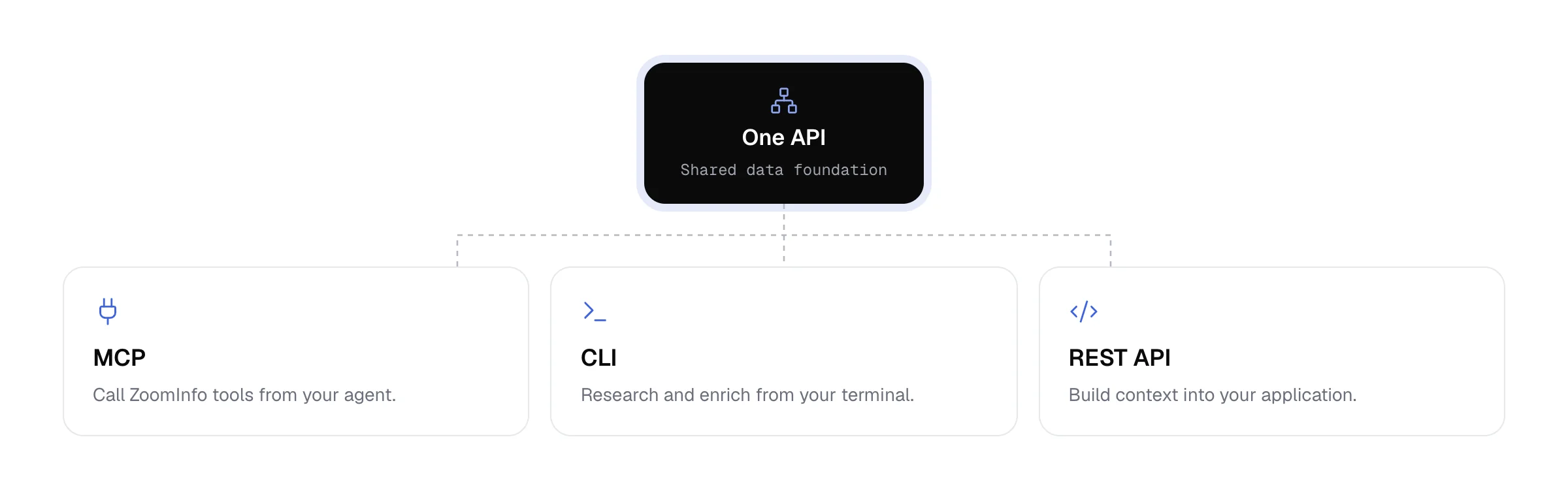
Tools and actions. APIs, MCP servers and native integrations let agents read data and act in your systems. The ZoomInfo MCP server is one route for agents built outside ZoomInfo.
Guardrails. Monitoring, access control, cost controls, real-time evaluations and an audit trail keep the system safe to run.
The tools layer has a bigger effect on cost than teams expect. In the GTM Bench runs, the web research setup spent about four times as much as the ZoomInfo CLI to finish the same ten tasks, used roughly 24 times as many tokens and took about three times as long as the ZoomInfo MCP. A web agent fetches and reads whole pages, while a structured query returns compact records. The GTM Bench write-up covers the full methodology, and our breakdown of MCP vs API for data enrichment covers which route fits which job.
The orchestration loop, step by step
Every orchestrated play runs the same seven-step loop:
Trigger. A signal starts the work, such as a form fill, a job change or a CRM stage change.
Plan. The supervisor breaks the goal into steps.
Route. Each step goes to the right specialist.
Act. Agents research, draft, update or brief.
Check. The supervisor evaluates each result against your rules.
Write back. Results land in the CRM and the tools reps use.
Resume. The play picks up again when a new signal arrives.
The best triggers are events your CRM already records. Brendan's team starts many of ZoomInfo's production agents from Salesforce events: "a lead has come inbound or we've set a demo or a demo has just run or we're 90 days from the renewal." Each one marks a moment when a rep would otherwise act by hand.
Here's the loop on one inbound lead. A demo request triggers the play, and the supervisor plans research, routing and a rep brief. A research agent pulls the company profile, buying committee and recent intent. A routing agent checks territory and ownership against your lead routing rules, and a writing agent drafts the brief. The supervisor checks each output, the brief goes to the owner in Slack and the record updates in the CRM. If the lead visits the pricing page a week later, the play resumes with everything it already knows.
AI Agent Orchestration Patterns
AI agent orchestration patterns describe how agents divide and pass work, and control models describe who makes the decisions. GTM plays usually combine several patterns under one supervisor.
Coordination patterns
Five coordination patterns cover the plays GTM teams run:
Pattern | How it works | GTM example | When to use it |
Sequential | Agents run in a fixed order, each using the last one's output | Research the account, draft outreach, then brief the rep | Steps depend on each other |
Parallel | Several agents work at once and results are merged | Research every contact on a buying committee at the same time | Speed matters and tasks are independent |
Handoff | An agent passes the work to the right specialist | Inbound qualification hands off to account research, then to a rep brief | The next step depends on what the first agent finds |
Supervisor-led | A supervisor plans, delegates and checks every step | One Agent Team running a full champion activation play | Work crosses systems and needs oversight |
Adaptive | The plan changes when new evidence arrives | A pricing-page visit or job change moves the play to a new step | Plays run over weeks |
Some frameworks also offer a group chat pattern, where agents debate a decision, such as whether a deal is at risk. It suits reviews more than buyer-facing actions.
Control models
For GTM, centralized or hierarchical control is the safer choice, because buyer-facing work needs one place to see what's running, check it and stop it. Here's how the four models compare:
Model | How decisions are made | Strength | Watch out for |
Centralized | One orchestrator decides every step | Easy to monitor and stop | Can become a bottleneck at high volume |
Hierarchical | A supervisor delegates to team leads that manage specialists | Scales while keeping one chain of control | More layers to design |
Decentralized | Agents coordinate peer to peer | Flexible and resilient | Hard to audit or predict |
Federated | Separate agent systems share some context under common rules | Fits large organizations with separate teams | Governance has to span every system |
AI Agent Orchestration in Action: Champion Activation
Champion activation is the clearest example of orchestration in GTM: one signal turns into research, routing, outreach and follow-up across several weeks, with every step recorded. When a past buyer moves to a new company, job change alerts catch it, and the alert is where traditional workflows stop. Here's how an orchestrated Agent Team carries it through:
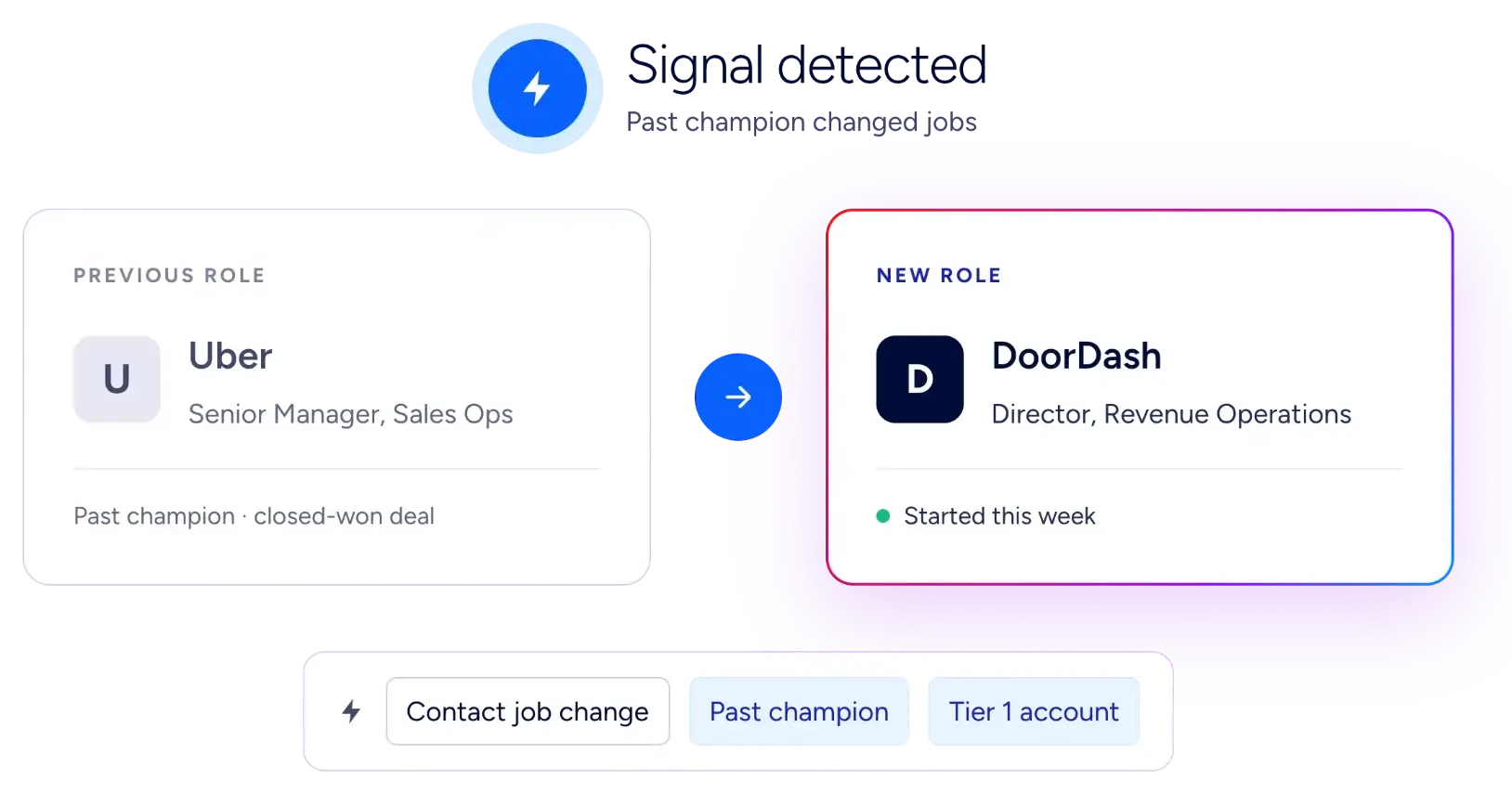
Signal. Jordan Ellis helped buy your product at Uber. Six months later, Jordan becomes Director of RevOps at DoorDash, a Tier 1 account.
Detection. A scheduled play checks a ZoomInfo Audience of past champions, spots the move and resolves Jordan to the right DoorDash record.
Research. A research agent rebuilds Jordan's role in the Uber deal and finds the current DoorDash account owner.
Routing check. The supervisor checks for an open opportunity or a different owner before anything goes out.
Outreach. A writing agent applies your champion play and drafts outreach grounded in the Uber relationship, and the owner gets a brief in Slack.
Follow-through. Two weeks later, Jordan visits your pricing page, and the play resumes with the full history.
Write-back. Every step is recorded in Salesforce or HubSpot.
A rules-based workflow would match the new title, create a CRM task and stop. Orchestration turns champion tracking into pipeline because the play keeps going until there's an outcome.
More GTM plays that need orchestration
The same model runs plays across the whole revenue cycle, from inbound to renewal:
Inbound lead activation. Research the lead, route it and brief the right rep in Slack, which is the core of inbound lead conversion.
MEDDIC capture. After each meeting, an agent reads the call and writes MEDDIC details to the opportunity. That keeps deal progression moving between meetings.
Closed-won lookalikes. ZoomInfo runs this one on its own sales team. Every day, an agent reviews new wins, finds each customer's competitors that aren't customers yet and sends unowned accounts to the rep who just closed the deal. A fresh win is when a rep knows the use case best, and Dennis Sevilla, ZoomInfo's Chief Strategy Officer, shared the note reps get in GTM Exclusives: "Here are 5 accounts that are in nobody's name. They're all yours."
Renewal at risk. Ninety days out, an agent flags accounts where engagement has dropped and the champion has gone quiet, then briefs the owner. Paired with lookalikes, it feeds customer expansion.
Challenges and Risks of AI Agent Orchestration
The biggest risks in AI agent orchestration are lost context, bad data spreading between agents, runaway cost, security gaps such as over-permissioned agents, and too much autonomy on buyer-facing work. Each has a known fix:
Challenge | What goes wrong in GTM | How to handle it |
Lost context at handoffs | The writing agent drafts outreach without the research agent's findings | Use one shared context every agent reads and writes |
One stale record spreading | A wrong title or old email flows into every downstream agent | Ground agents in verified data and re-verify on a schedule |
Runaway cost | Agents loop on web searches and burn tokens on large pages | Use structured data tools and estimate cost before each run |
Over-permissioned agents and prompt injection | An agent with broad write access acts on instructions hidden in an inbound email | Scope permissions per agent and treat inbound content as untrusted |
Too much autonomy on buyer-facing actions | An agent emails the wrong contact or changes a deal stage | Keep revenue-moving writes with people and log every action |
Agent sprawl and shadow agents | Teams build agents nobody tracks | Keep an inventory with a named owner for every agent |
Data quality sits underneath several of these risks. B2B data decay means records go stale every month. Agents need a verified data foundation and a schedule for re-checking it.
Ownership matters just as much. Mollie Bodensteiner, VP of Revenue Operations at ZoomInfo, argues that ownership of an agent is "not a department." It's a person, with a backup who can fix it when that person is out. Our guide to governing AI agents at scale covers ownership, monitoring and audit in depth.
How to Choose an AI Agent Orchestration Platform
Choose an AI agent orchestration platform by checking its data, its supervisor, where its agents can act, how it's governed and how fast it gets a play live. Start by knowing which kind of product you're looking at.
Platforms vs frameworks vs tools
Frameworks are for engineers building from scratch, tools solve one piece, and platforms run and govern agents in production:
Frameworks. AI agent orchestration frameworks such as LangGraph and Microsoft Agent Framework give engineers the building blocks to code their own multi-agent systems. You own the hosting, data connections and governance.
Tools. Single-purpose products solve one piece, such as an AI SDR or a meeting notetaker.
Platforms. These run, govern and connect agents in production, with data, integrations and controls included.
GTM engineering teams often mix the three, using a platform for core plays and a framework for edge cases.
What to look for in a GTM orchestration platform
A GTM orchestration platform should pass six checks:
Verified data and account context. Agents need current contacts, firmographics and signals joined with your CRM history.
A supervisor with real-time evaluations. Every step should be checked before the play moves on.
Native actions. Agents should act directly in Salesforce, HubSpot, your sales engagement platform and Slack.
Governance. Look for monitoring, access control, cost estimates before each run and an audit trail.
Build options. Ready-made templates, plain-language building and API, CLI and MCP access for engineers.
Time to first live play. If the goal is pipeline this quarter, days to launch count for more than a long feature list.
For a side-by-side of the leading options, see our list of multi-agent orchestration platforms. Teams building their own stack can also compare GTM engineering tools.
How ZoomInfo Orchestrates Agents for GTM
ZoomInfo is an all-in-one AI GTM Platform and the number one place for sales, marketing and RevOps to run agentic workflows. It runs on three layers:
Data. 500M contacts and 100M companies, kept current by 300+ human researchers. The GTM Context Graph joins that data with your CRM records, calls, emails and signals, processing 1.5B+ data points daily.
Agent Orchestration. Agents act on that context and write results back, with governance and audit logging applied throughout.
Universal Access. GTM Workspace for sellers, GTM Studio for RevOps, marketers and GTM engineers, and GTM.AI for any tool or agent.
Agent Teams
Agent Teams is ZoomInfo's flagship multi-agent product in GTM Studio. Give your agents an outcome, not a task, such as opening a target account or protecting a renewal.
Plays that adapt. Signals such as job changes, intent spikes, website visits and CRM events open or resume a play, and Playbooks set the goal and bounds. Plays keep running for weeks.
A supervisor on every step. A supervisor agent checks each step with real-time evaluations, so a play runs the same way every time.
Native actions. Agents act in Salesforce, HubSpot, Outreach, Salesloft, Slack and Gmail and write every step back to the CRM.
50+ ready-made agents. Start from templates for outbound prospecting, inbound lead activation and renewals, or describe a new play in plain language.
Live in a day. ZoomInfo's forward-deployed team helps get the first plays running.
Agent Teams is part of GTM Studio with no new SKU or contract. This short video shows how to build an Agent Team from a ready-made template.
GTM.AI for teams building their own agents
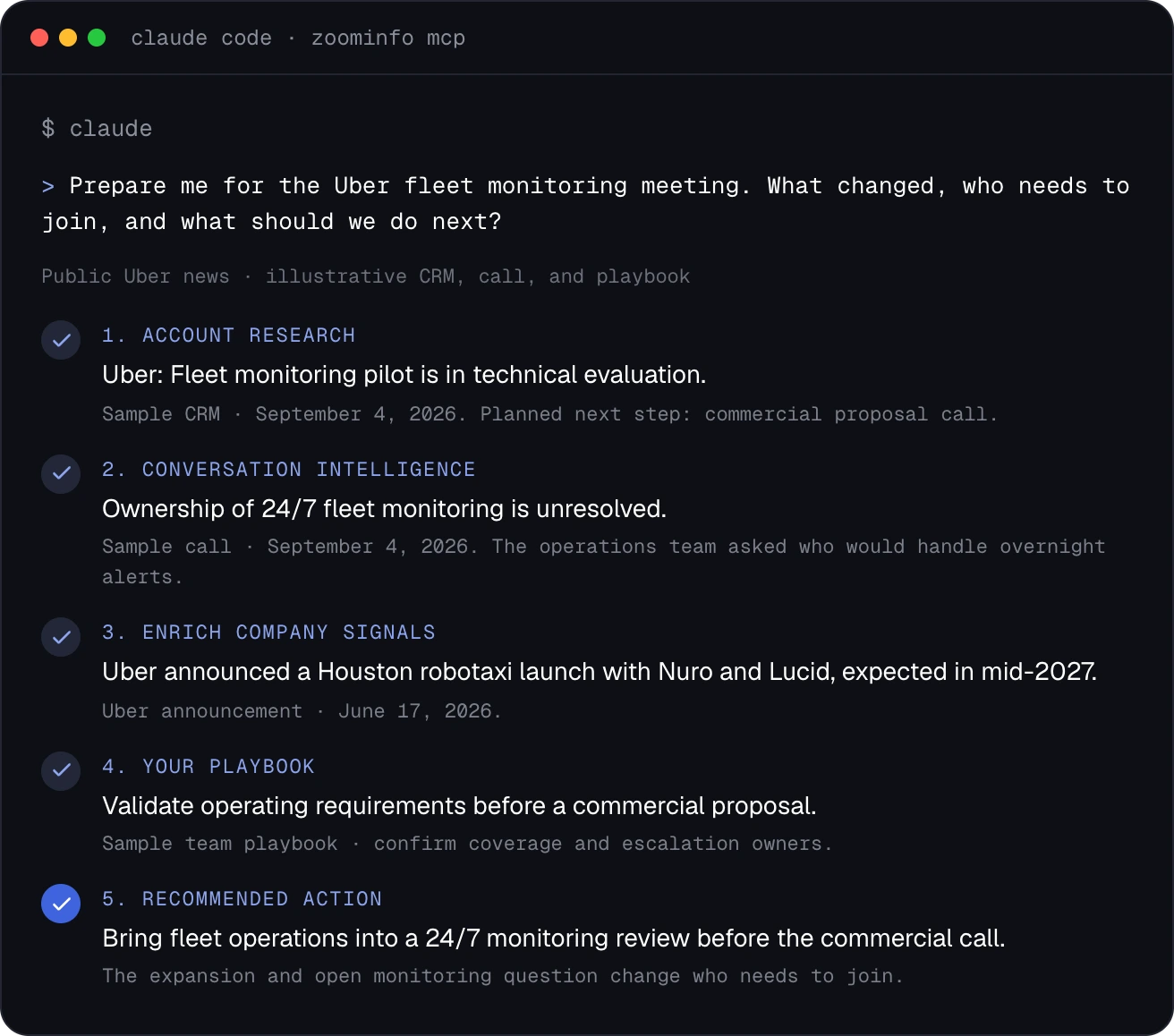
GTM.AI is the headless route into the same data and context. Agents in Claude, ChatGPT or your own code connect through its API, the GTM CLI or the ZoomInfo MCP server, and it's free to start, with consumption-based credits. Here's what that looks like when Claude Code uses the ZoomInfo MCP server to prep a customer meeting.
Guardrails
Hand over the work. Keep the control. Every Agent Team runs inside guardrails your admins set:
Monitoring. Every play is monitored, so mistakes are found and fixed before they affect the business.
Cost controls. AI credit usage is estimated before a play is activated and tracked for each Agent Team.
Admin oversight. Organization-wide dashboards show what every Agent Team is doing.
Access control. Role management decides who builds and runs Agent Teams.
Grounding. Organization-level knowledge bases keep agents aligned with your ICPs, brand and SOPs.
Real-time evaluations. Each step is checked, so a play runs the same way every time.
Audit trail. Every step is written back to Salesforce or HubSpot, with every decision recorded in one place.
ZoomInfo maintains SOC 2 controls and is ISO 27001 and ISO 27701 certified.
How to Orchestrate AI Agents for GTM
To orchestrate AI agents for GTM, start with one play, give it clean data and connected systems, set guardrails, then expand once the numbers hold. Brendan starts by stepping into the shoes of each role on the team and listing the tasks they repeat every day or week. Those tasks are your first candidates. From there:
Pick one play. Choose one with a clear trigger and outcome, such as champion activation or inbound lead activation.
Map the data it needs. List the fields each agent reads and check coverage across your target accounts. Brendan's warning: if "you only have industry on like 50% of your accounts, well, your agent is not going to be too effective." That's why CRM enrichment comes first.
Connect the systems. Give agents read and write access to the CRM, sales engagement platform and Slack, scoped to what the play needs.
Set guardrails and oversight. Decide what agents do on their own, who builds and runs them and how you track cost.
Measure, then expand. Track pipeline created, speed to first touch and hours saved before adding the next play.
Give Your Agents an Outcome, Not a Task
AI agent orchestration turns a set of disconnected agents into a team that runs complete plays, with shared context, a supervisor checking each step and guardrails around all of it. For GTM, the data underneath decides how well and how cheaply that team works. ZoomInfo is the number one place to run that work, with Agent Teams orchestrating plays on verified data inside the tools your team already uses.
To see an Agent Team run a play on your own accounts, meet with a GTM expert.
Frequently Asked Questions
These answers cover common questions about orchestrating AI agents, from definitions to setup time and cost.
What is AI agent orchestration?
AI agent orchestration is the coordination of multiple AI agents under a supervisor that plans the work, routes each step, shares context and keeps agents inside your rules. Agent orchestration and agentic orchestration describe the same idea.
What is an AI orchestration agent?
An AI orchestration agent, often called a supervisor or orchestrator agent, is the agent that manages the others. It breaks a goal into steps, assigns each step to a specialist agent, checks the results and decides what happens next.
What role does MCP play in AI agent orchestration?
The Model Context Protocol (MCP) is an open standard that connects agents to tools and data through one interface. Orchestration decides which agent acts and when, and MCP gives those agents a consistent way to reach systems such as a CRM or a data platform.
Is AI agent orchestration only for large enterprises?
No. Any team running plays across several tools can benefit. Smaller teams usually start with one play, such as inbound lead activation, and expand once it shows results. Teams with engineers can also build on a headless option such as GTM.AI.
Can AI agent orchestration work inside Salesforce or HubSpot?
Yes. Orchestrated agents can read from and write to Salesforce and HubSpot, and CRM-native agents such as the Agentforce Prospecting Agent run inside them. Agent Teams works alongside both, with native integrations that write every step back to the CRM.
Do orchestrated agents still need human oversight?
Yes. People set the goals, bounds and rules, decide which actions agents can take on their own and review the work through monitoring and audit trails. Revenue-moving changes, such as deal stage updates, are best kept with a person.
How long does it take to set up AI agent orchestration?
It depends on the approach. A custom build on a framework can take months. A platform with ready-made templates is much faster, and Agent Teams can be live in a day with help from ZoomInfo's forward-deployed team.
How much does AI agent orchestration cost?
Cost depends on the platform's pricing model and on how much work each agent does to find its data. In GTM Bench, the same agent finished the same GTM research tasks with the ZoomInfo CLI at about a quarter of the cost of web research, using a fraction of the tokens. ZoomInfo offers flexible packages built around your needs, GTM.AI is free to start with consumption-based credits, and Agent Teams shows a credit estimate before each play runs.
