
Connecting an AI agent to live B2B data now takes a hosted endpoint and a prompt, and Crustdata's MCP server is one of the first many teams try.
It’s broad and quick to set up, though how it sources data, handles personal records, and bills usage each deserve a look before you build on it.
This guide weighs what Crustdata's server does well, the gaps to check, and how it compares with the ZoomInfo MCP server for go-to-market work.
What You Get With the Crustdata MCP Server
Crustdata is a real-time B2B data provider built for AI agents, covering people and company records that sales, recruiting, and investment teams query on demand.
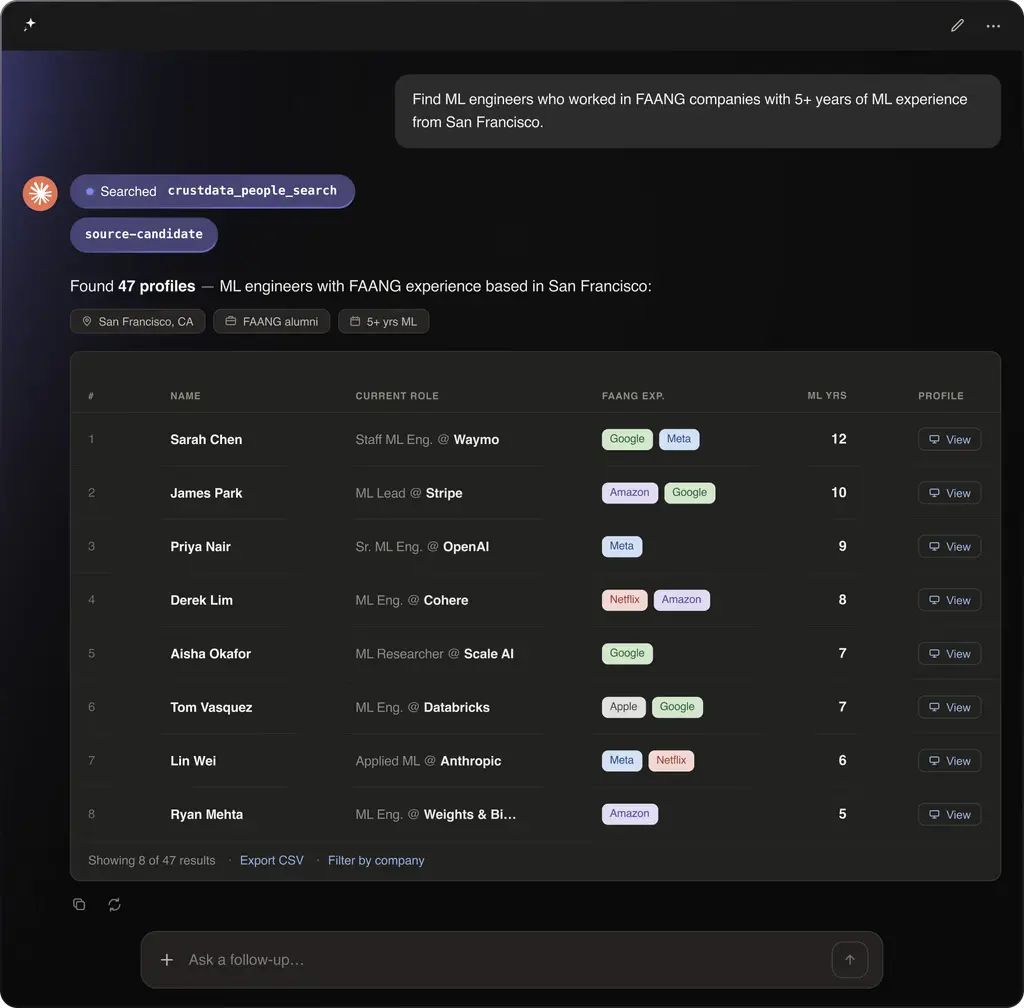
Its MCP server turns that data into tools your agent calls from a plain-English prompt, so instead of exporting files or wiring endpoints by hand, the agent describes what it needs and Crustdata resolves each request to a live query in the same thread.
Source: Crustdata
Tools and coverage
Crustdata's own listing counts 40 tools across seven groups:
Company data: identify, enrich, and search company records.
People data: search, enrich, contact-enrich, and batch-enrich people.
Jobs: standard, live, and batch job searches across companies and roles.
Social: pull posts from profiles, companies, and keywords into the workflow.
Web: web search and page fetch when the agent needs outside context.
Watchers: webhook alerts that fire when a tracked company or person changes.
Utilities: check credit costs and balances before running a larger prompt.
The data behind those tools spans 1B+ people and 60M+ companies from 15+ sources, queried in real time against fresh indexes rather than pre-exported files.
Setup and access
Connection is quick and differs by client type:
Claude and Cursor sign in to the hosted endpoint over OAuth, with no key to paste.
File-based clients such as VS Code and Codex take a Crustdata API key in their config.
Crustdata frames the whole setup as a five-minute task, and every new account includes free starter credits with no card required.
What Crustdata Does Well
Crustdata is a strong option when speed and coverage are the priority. Three things stand out:
Breadth. Forty tools across company, people, jobs, social, web, and monitoring give an agent wide reach from a single connection, which suits sales prospecting, recruiting, and VC deal sourcing.
Freshness. Queries hit live indexes on demand, so an agent building a prospect list works against current records instead of a stale export.
Developer ergonomics. OAuth removes key management for Claude and Cursor, the hosted endpoint means nothing to run locally, and the watcher tools let an agent stand up webhook monitoring straight from a prompt.
For a builder who wants wide data access fast, Crustdata is a reasonable pick.
Four Crustdata Gaps to Check Before You Connect
Every strength has a cost. Here are four drawbacks to weigh before you connect, each drawn from Crustdata's own documentation and independent reviews of the connector, including a third-party assessment of its directory listing by Agentman.
Unnamed data sources
Crustdata's published claim is 15+ sources, and it names none of them anywhere in its documentation. If your use case needs to know whether a record was licensed, contributed, or scraped, that answer is not on the page.
Personal-data exposure
Every people tool returns individual records, and there is no aggregate-only mode. Contact enrichment can return business emails, personal emails, and phone numbers, and a watcher can track a named person on a recurring schedule with no documented expiry and no listed tool to delete it once created. Any team managing how much personal data an agent can reach will want to review this against policy.
Cost you see only after the call
Crustdata bills per result rather than per call, and the bill lands after the call returns. A broad search that returns many records is charged for each one. An agent can check its balance first through the utilities group, which helps, but there is no per-call cost preview.
A tool count that shifts by client
The exposed surface depends on how you connect. Crustdata's site lists 40 tools, Anthropic's Connectors Directory listing shows 23, and the Composio gateway exposes 14. Confirm the count in your specific client before you plan a workflow around it.
None of these disqualify Crustdata. They are the questions a careful GTM buyer asks, and they frame a fair comparison with how another server handles the same job.
How the ZoomInfo MCP Server Compares
ZoomInfo is an all-in-one AI GTM Platform, and its MCP server is one way to reach it.
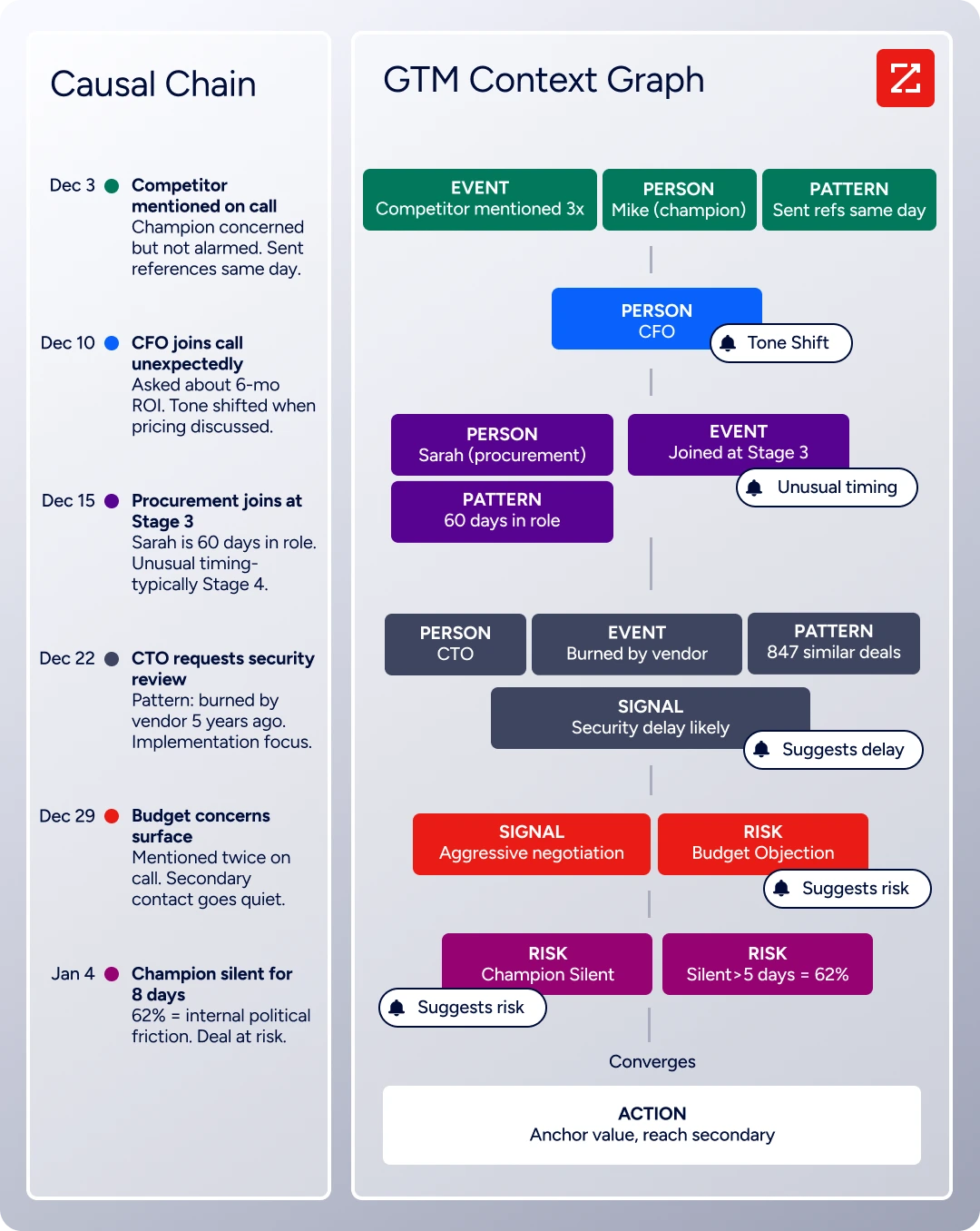
The platform runs as three connected layers: a Data foundation of verified B2B records, the GTM Context Graph intelligence layer that reasons over those records, and Universal Access, the surfaces teams use to consume both. The ZoomInfo MCP server sits in that top layer as part of GTM.AI, the platform's headless API and MCP option for any tool or agent.
Verified data over raw volume
ZoomInfo's foundation is built through multi-source verification backed by 300+ human researchers, reaching up to 95% accuracy on first-party data across 600M+ contacts and 100M+ companies. Where Crustdata leaves its 15+ sources unnamed, ZoomInfo's model centers on continuous verification, which is what counts when an agent grounds a decision on the record it retrieves.
The payoff of that verified foundation shows up in customer outcomes.

"I give props to the data services team at ZoomInfo. They've done really a great job working with us to get us what we need."
Governance and cost built into the connection
Every MCP call runs through ZoomInfo's gateway, which enforces the entitlements your package already carries, so an agent sees the same data a user sees in the web app and nothing beyond it. On top of that:
All MCP tools are currently read-only, with no data written back.
Admins control access per user.
Records Under Management holds cost steady: once a record is enriched, it is not charged again for 12 months across any ZoomInfo surface.
Search, lookup, and discovery tools are free, with credits spent only on enrichment and research.
Reasoning over your own context
Crustdata hands records to the agent. ZoomInfo pairs its data with the GTM Context Graph and a set of context agents that synthesize third-party data with your own CRM and conversation history:
Account Research: a full intelligence briefing on a company.
Contact Research: the same depth on a person.
Conversation Intelligence: what was said, agreed, or pushed back on across calls and emails.
For workflows that need an agent to explain why an account is moving, going beyond a list of its current fields, that intelligence layer is the difference.
Crustdata MCP vs ZoomInfo MCP
Here is how the two servers compare across the criteria that matter for GTM work.
Criteria | Crustdata MCP | ZoomInfo MCP |
Coverage | 1B+ people, 60M+ companies | 600M+ contacts, 100M+ companies |
Tool surface | 40 published; count varies by connection (14 to 40) | Focused toolset; search and discovery tools free |
Data provenance | 15+ sources, not named | Multi-source verification, 300+ researchers, up to 95% accuracy on first-party data |
Personal-data governance | Every people tool returns personal data; no aggregate-only mode | Package entitlements enforced at the API level; read-only; admin per-user access control |
Cost model | Per result, billed after the call | Free search; credits on enrich and research; no repeat charge for 12 months under RUM |
Returns records to the agent | Records plus GTM Context Graph reasoning and context agents | |
Clients | Claude, Cursor, any MCP client | Claude, ChatGPT, Copilot, Gemini, Cursor, Slack, and more |
Setup | Hosted endpoint, OAuth, about five minutes | Marketplace install or custom connector, OAuth |
How to Connect Each Server
Both servers connect over OAuth in a few minutes. Here is the path for each.
Crustdata. Add its hosted endpoint in a supported client such as Claude or Cursor and approve access over OAuth; file-based clients use a Crustdata API key instead. Free starter credits let you test queries before committing.
ZoomInfo. Add ZoomInfo from your client's connector marketplace, or as a custom connector in any MCP-compatible tool, then sign in with your own ZoomInfo credentials over OAuth. Access is scoped to your login, so tools like Account Research return context tied to your accounts and CRM relationships. Teams can reach the same data three ways, all drawing on one credit pool:
MCP for interactive, prompt-driven work inside an AI tool.
The GTM CLI for scripts and agent workloads where token budget matters.
The REST API for application code.
For a fuller breakdown of which path fits which job, see MCP versus API for data enrichment and the best CLI tools for sales roundup.
Which Server Should You Choose
Both connect an AI agent to live B2B data over MCP, so the decision comes down to what your workflow rewards:
Choose Crustdata for developer-first teams that want wide, real-time data access across sales, recruiting, and investment sourcing, and that are comfortable managing personal-data access and per-result cost themselves.
Choose ZoomInfo when the data behind an agent's answer has to be trusted: verified multi-source records, entitlements enforced on every call, read-only access, and cost that holds steady through Records Under Management. The ZoomInfo MCP server also reasons over your first-party data, so a prospecting agent returns a next action rather than a raw list, as covered in Claude MCP for sales prospecting and sales MCP agents.
If your agents need current, verified B2B data with governance built in, start building on ZoomInfo.
Crustdata MCP Server FAQ
What is the Crustdata MCP server?
It is a hosted Model Context Protocol endpoint that gives AI assistants like Claude and Cursor live access to Crustdata's B2B data as callable tools. Crustdata's documentation describes coverage of 1B+ people and 60M+ companies from 15+ sources, reached through tools for search, enrichment, and monitoring.
How do I connect the Crustdata MCP server to Claude?
Add Crustdata's hosted endpoint as a custom server in Claude's settings and approve access over OAuth. There is no key to paste for Claude or Cursor, while file-based clients use a Crustdata API key in their config.
How many tools does the Crustdata MCP server have?
Crustdata's own listing counts 40 tools across seven groups. The number you actually get depends on how you connect: Anthropic's Connectors Directory listing shows 23, and the Composio gateway exposes 14, so check the surface in your specific client.
Does the Crustdata MCP server return personal contact data?
Yes. Its people tools return individual records, and contact enrichment can return business emails, personal emails, and phone numbers. There is no aggregate-only mode, so if limiting personal-data exposure to an agent is a requirement, review that behavior before connecting.
Crustdata MCP vs API: when should I use each?
Use the MCP server for conversational, agent-driven workflows where a person or agent asks for data in plain language. Use a direct API for production pipelines and application code. Both reach the same underlying data.
Is there a ZoomInfo alternative to the Crustdata MCP server?
Yes. The ZoomInfo MCP server exposes verified B2B data to AI agents with entitlement enforcement, read-only access, and context agents that reason over your first-party CRM and conversation data alongside ZoomInfo's records.
