

B2B teams rely on data, but it is often incomplete or outdated as soon as it enters their systems. Contact records miss direct dials, company data is partial, and job titles change frequently.
Those gaps make outreach less precise and CRM data less reliable.
CSV enrichment solves this by matching records against a B2B contact database and filling in missing contact and company information at scale.
This guide covers what CSV enrichment is, how it works, and what to look for when choosing a tool.
What Is CSV Enrichment?
CSV enrichment is the process of uploading a CSV file of contact or company records to an enrichment tool. The tool matches each row against a database and adds missing data fields. You start with a partial list. You get back a complete one.
A CSV (comma-separated values) file is a plain-text spreadsheet format. Every CRM, marketing platform, and spreadsheet app can export and import CSVs. That universal compatibility is what makes CSV-based workflows practical for B2B teams.
What does enrichment actually add? It depends on your B2B data provider and the fields you select, but common additions include:
Verified business email addresses for contacts missing email data
Direct-dial phone numbers that bypass the main switchboard
Job titles and seniority levels for more precise targeting
Company size, revenue, and industry for firmographic segmentation
Tech stack data showing which tools a company uses
Company headquarters location for territory and region-based outreach
Here is a concrete example. You export a list of 500 leads from a webinar. Each row has a name, company, and the email they used to register (often a personal Gmail).
After running that file through a CSV enrichment tool, you get back verified business emails, direct-dial numbers, updated job titles, company revenue ranges, and employee counts. Your 500 partial records become 500 actionable contacts.
How CSV enrichment differs from CRM and API enrichment
CSV enrichment is one of three common approaches to data enrichment. Each serves a different use case.
Approach | Best for | Setup | Cadence |
CSV enrichment | One-time list cleanup, event follow-up, pre-CRM enrichment | Drag and drop, no code | One-off, ad hoc |
API enrichment | Teams with engineering resources who need enrichment inside automated workflows | Developer integration with a data enrichment API | Real-time, on demand |
CRM enrichment | Ongoing data hygiene across the entire database | Native or marketplace integration | Continuous or scheduled |
CSV enrichment is the right fit when you have a list that needs enrichment now, you do not have developer resources, and you want results in minutes instead of weeks. It is also the easiest way to test an enrichment provider before committing to a deeper integration.
How CSV Enrichment Works: Step by Step
The process follows a straightforward sequence.
Prepare your CSV file. Clean your data before uploading. Remove duplicates, standardize column headers, and make sure each row has at least one strong identifier.
Upload to your enrichment tool. Most platforms accept standard CSV files through a drag-and-drop interface or file selector.
Map columns to enrichment fields. The tool needs to know which column contains the email, company name, and contact name. Most tools auto-detect common headers, but verify the mapping.
Run the enrichment. The tool matches each row against its database and appends the missing data fields you selected.
Review and download. Check match rates and scan a sample of enriched records for accuracy before proceeding.
Import into your CRM or marketing platform. Load the enriched file into Salesforce, HubSpot, or whatever system your team uses.
How to Prepare Your CSV File for the Best Results
The quality of your enrichment output depends on the quality of your input file. A few preparation steps make a significant difference.
Required identifiers. Every row needs at least one strong identifier for the tool to match against:
Business email address (the single best match key)
Full name plus company name (when email is unavailable)
Providing multiple identifiers per record improves your match rate. A row with both a name and a company will match more reliably than a row with just a name.
File format. Save your file as UTF-8 encoded, comma-delimited CSV. Avoid Excel-specific formats (.xlsx) unless the tool explicitly supports them. Special characters and non-standard encoding cause matching errors.
Common mistakes to avoid:
Merged or inconsistent columns. "John Smith, Acme Corp" in a single column is harder to match than separate Name and Company columns.
Duplicate rows. Duplicates waste enrichment credits and create confusion downstream. Deduplicate before uploading to keep your input clean.
Missing headers. Column headers like "First Name," "Last Name," "Company," and "Email" help the tool auto-map fields correctly.
Outdated identifiers. An email from a domain that no longer exists will not match. B2B data decays quickly, so use the freshest identifiers you have.
Five Common CSV Enrichment Use Cases
CSV enrichment fits into dozens of B2B workflows. Here are the five most common.
Pre-CRM import. Enrich leads before loading them into Salesforce or HubSpot. This prevents incomplete records from cluttering your sales and marketing database and triggering broken routing rules or scoring models.
Database cleanup. Refresh stale records from legacy lists. If your database has not been updated in six months, a bulk enrichment pass fills in gaps and flags records that have gone cold. Pair this with CRM hygiene best practices and continuous lead enrichment for sustained results.
ABM planning. Build out buying committees with firmographic data. Upload a list of target accounts, enrich with contacts by department and seniority, and walk into your account-based marketing campaign with a complete picture of the buying group. Learn more about building an ideal customer profile to sharpen your targeting.
Event follow-up. Enrich webinar or tradeshow lead lists. Event registrations often capture minimal data, sometimes just a name and personal email. CSV enrichment adds verified business emails, job titles, and company context so your sales team can follow up with the right message to the right person.
Campaign segmentation. Enrich a broad list with company size, industry, and tech stack data, then segment into precise audiences for email, ads, or direct mail campaigns. The more data points you have, the tighter your customer segmentation and the higher your response rates. Treat this as one input into your broader B2B lead generation motion.
How ZoomInfo Powers CSV Enrichment at Scale
ZoomInfo's data platform is built for the kind of bulk enrichment that CSV workflows demand. The platform maintains a database of 500M+ professional contacts and 100M+ company profiles, verified through a multi-source pipeline that processes 1.5B+ data points daily.
That scale translates directly into higher match rates when you upload a CSV for enrichment. More records in the database means more of your rows come back with verified emails, direct dials from an executive contact database, and firmographic details.
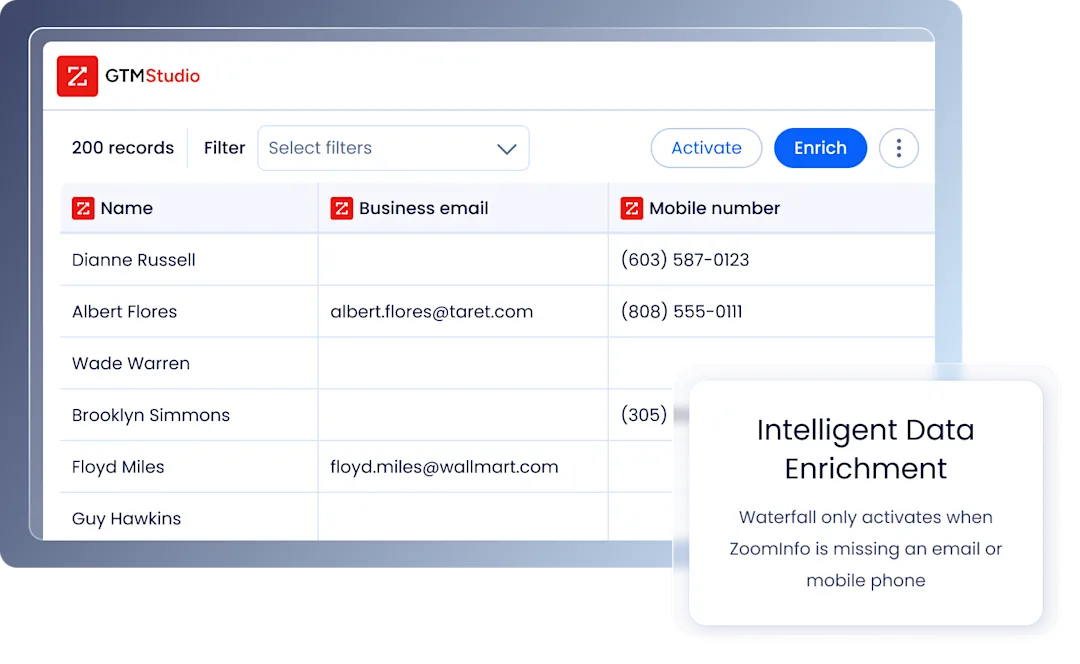
Beyond raw data coverage, ZoomInfo brings three capabilities that matter for CSV enrichment:
AI-driven intelligence through the GTM Context Graph. ZoomInfo doesn’t just return static contact fields. The GTM Context Graph fuses ZoomInfo's B2B data with buyer intent signals, conversation intelligence, and behavioral data. This means enriched records carry context about whether a company is actively in-market, not just who works there.
Waterfall enrichment across 25+ data sources. GTM Studio evaluates multiple data sources in parallel and returns the highest-confidence result for each field, included at no additional cost. This waterfall enrichment approach increases match rates without sacrificing accuracy, and is the same principle that underpins the broader category of waterfall enrichment tools.
Universal access across tools and workflows. You can access ZoomInfo's intelligence inside its own products, through B2B data APIs, or via MCP for AI-native access inside Claude and ChatGPT. The same enriched records also form a data foundation for agentic AI workflows, so whether you prefer the traditional CSV upload or want to query data through natural language, the verified intelligence is consistent.
ZoomInfo's compliance infrastructure (ISO 27701, ISO 27001, SOC 2 Type II) is built into the data layer itself, so enriched records meet enterprise privacy and security requirements.
What to Look for in a CSV Enrichment Tool
Not all enrichment tools deliver the same results. Here is what separates a strong platform from a mediocre one.
Data coverage and accuracy. The size and quality of the underlying database determines your match rate and the reliability of the enriched data. Look for providers with broad B2B contact data and company coverage backed by continuous verification. Many of the strongest options also operate as data-as-a-service providers, giving you flexibility in how you consume the data.
Match rate and email verification. A high match rate means more of your records come back enriched. But match rate alone is not enough. Verified records matter more than inflated match rates. Ask providers about their accuracy methodology and how their email finder and verification process works, including the email verification tools built into their pipeline.
Compliance. GDPR, CCPA, and other EU privacy laws apply to enriched data. Your provider should have clear compliance certifications and processes.
Integration with CRM and sales tools. Native integrations with Salesforce, HubSpot, and marketing automation platforms save time and reduce manual import errors. Connectors to a wider stack of sales intelligence tools extend the value of every enriched record.
Pricing transparency. Understand whether you are charged per record, per field, or per file. Hidden fees and opaque credit structures make it difficult to forecast costs.
CSV Enrichment Best Practices
Follow these guidelines to get the most out of every enrichment run.
Provide multiple identifiers per record. A row with a name, company, and email will match more reliably than a row with just a name.
Test with a small batch first. Upload 50 to 100 records. Check the match rate, review enriched fields for accuracy, and adjust column mapping before enriching thousands of records.
Re-enrich quarterly. B2B data goes stale. A quarterly cadence for your most active lists keeps outreach hitting valid contacts and prevents deliverability erosion. Tools like job change alerts can flag when contacts move so you re-enrich proactively.
Validate before CRM import. Spot-check a sample of enriched records. Confirm emails are formatted correctly, phone numbers include country codes, and job titles look accurate. This is the moment to apply your wider effort around improving data quality in CRM.
Standardize data before uploading. Consistent formatting for names, companies, and emails helps the enrichment tool match more records. Clean inputs produce clean outputs, which compounds the impact of any AI data enrichment layered on top.
From CSV to Continuous Enrichment
You now have what you need to turn a partial list into a usable one. Prep the file, run it through enrichment, and check the results before they hit your CRM.
For ongoing data hygiene beyond one-time files, look at continuous CRM data enrichment connected directly to your stack. The same data enrichment tools typically support both workflows on the same backend, so once you have proven CSV results, switching on automation is straightforward. Treating enriched contacts as part of your broader go-to-market data layer keeps every team working from the same source of truth.
ZoomInfo makes that process worth running. A verified database of 500M+ contacts, GTM intelligence across the entire revenue motion, and waterfall matching across 25+ sources means higher match rates, fewer bounced emails, and contacts your sales team can actually reach.
Talk to our team to see how it works for your list.
Frequently Asked Questions
What's the difference between CSV enrichment and CRM enrichment?
CSV enrichment is a one-time fill on a file you upload. CRM enrichment is an ongoing connection that keeps records current as contacts change roles and companies grow. Most platforms support both workflows on the same backend — the choice is about how often you need data refreshed.
Can I enrich a CSV with only email addresses?
Yes. Most tools can reverse-lookup from email to find name, company, job title, and firmographics. Match rates improve significantly when you also include a company domain or full name alongside the email.
How long does CSV enrichment take?
Files under 1,000 rows usually finish in a few minutes. Larger batches of 10,000 to 100,000 rows typically take 15 minutes to an hour, depending on the provider and the number of fields requested.
What's a good match rate to expect?
A strong provider should hit 70–90% on a well-prepared list with multiple identifiers per row. Match rate drops when input data is sparse, outdated, or limited to a single weak identifier like a personal email.
What does CSV enrichment typically cost?
Providers charge per record or per credit. Often one credit per matched record, with credits sold in packs. Some bill separately per field. Others bundle enrichment into a broader GTM subscription. Ask how partial matches are charged. Paying full price for a row that came back with only one or two fields is the detail that breaks forecasts.
Is CSV enrichment GDPR compliant?
It can be, but it depends on the vendor. Look for providers with documented compliance certifications like ISO 27701, ISO 27001, and SOC 2 Type II, and confirm how they source and verify European contact data before enriching lists in regulated regions.
